We Got Claude to Fine-Tune an Open Source LLM








We gave Claude the ability to fine-tune language models using a new tool called Hugging Face Skills. Not just write training scripts, but to actually submit jobs to cloud GPUs, monitor progress, and push finished models to the Hugging Face Hub. This tutorial shows you how it works and how to use it yourself.
Claude Code can use "skills"—packaged instructions, scripts, and domain knowledge—to accomplish specialized tasks. The
hf-llm-trainerskill teaches Claude everything it needs to know about training: which GPU to pick for your model size, how to configure Hub authentication, when to use LoRA versus full fine-tuning, and how to handle the dozens of other decisions that go into a successful training run.
With this skill, you can tell Claude things like:
Fine-tune Qwen3-0.6B on the dataset open-r1/codeforces-cots
And Claude will:
- Validate your dataset format
- Select appropriate hardware (t4-small for a 0.6B model)
- Use and update a training script with Trackio monitoring
- Submit the job to Hugging Face Jobs
- Report the job ID and estimated cost
- Check on progress when you ask
- Help you debug if something goes wrong
The model trains on Hugging Face GPUs while you do other things. When it's done, your fine-tuned model appears on the Hub, ready to use.
This isn't a toy demo. The skill supports the same training methods used in production: supervised fine-tuning, direct preference optimization, and reinforcement learning with verifiable rewards. You can train models from 0.5B to 70B parameters, convert them to GGUF for local deployment, and run multi-stage pipelines that combine different techniques.
Setup and Install
Before starting, you'll need:
- A Hugging Face account with a Pro or Team plan (Jobs require a paid plan)
- A write-access token from huggingface.co/settings/tokens
- A coding agent like Claude Code, OpenAI Codex, or Google's Gemini CLI
Hugging Face skills are compatible with Claude Code, Codex, and Gemini CLI. With integrations Cursor, Windsurf, and Continue, on the way.
Claude Code
- Register the repository as a plugin marketplace:
/plugin marketplace add huggingface/skills
- To install a skill, run:
/plugin install <skill-folder>@huggingface-skills
For example:
/plugin install hf-llm-trainer@huggingface-skills
Codex
- Codex will identify the skills via the
AGENTS.mdfile. You can verify the instructions are loaded with:
codex --ask-for-approval never "Summarize the current instructions."
- For more details, see the Codex AGENTS guide.
Gemini CLI
This repo includes
gemini-extension.jsonto integrate with the Gemini CLI.Install locally:
gemini extensions install . --consent
or use the GitHub URL:
gemini extensions install https://github.com/huggingface/skills.git --consent
- See Gemini CLI extensions docs for more help.
Connect to Hugging Face
You will to authenticate you Hugging Face account with a write-access token so that the job can create a model repo.
Set up your token:
hf auth login
# or
export HF_TOKEN=hf_your_write_access_token_here
![NOTE] Configure Hugging Face MCP Server to use your write token by sending it in either the
HF_TOKENorAuthorization: BearerHTTP Headers.
Your First Training Run
Let's walk through a complete example. We'll fine-tune a small model to see the full workflow, then explore more advanced capabilities.
Instruct the coding agent to fine tune
Start with a simple and clear instruction to fine tune a specific model
Fine-tune Qwen3-0.6B on the open-r1/codeforces-cots dataset for instruction following.
The coding agent analyzes your request and prepares a training configuration. For a 0.6B model on a demo dataset, it selects t4-small—enough GPU for this model size and the cheapest option available.
The
open-r1/codeforces-cotsdataset is a dataset of codeforces problems and solutions. It is a good dataset for instruction tuning a model to solve hard coding problems.
Review Before Submitting
Before your coding agent submits anything, you'll see the configuration:
I'll fine-tune Qwen/Qwen3-0.6B on open-r1/codeforces-cots using SFT.

Configuration:
- Hardware: t4-small (~$0.75/hour)
- Estimated time: ~20 minutes
- Estimated cost: ~$0.30
- Output: username/qwen-codeforces-cots-sft

The model will be pushed to Hub automatically. Should I submit?
This is your chance to adjust anything. Change the output repo name, pick different hardware, or ask Claude to modify training parameters. Once you approve, the agent submits the job.
For example, you can ask the agent to try a test run:
Do a quick test run on 100 examples.
Track Progress
After submission, you get job details:
✅ Job submitted successfully!

Job ID: abc123xyz
Monitor: https://huggingface.co/jobs/username/abc123xyz

Expected time: ~20 minutes
Estimated cost: ~$0.30

View real-time metrics at: https://huggingface.co/spaces/username/trackio
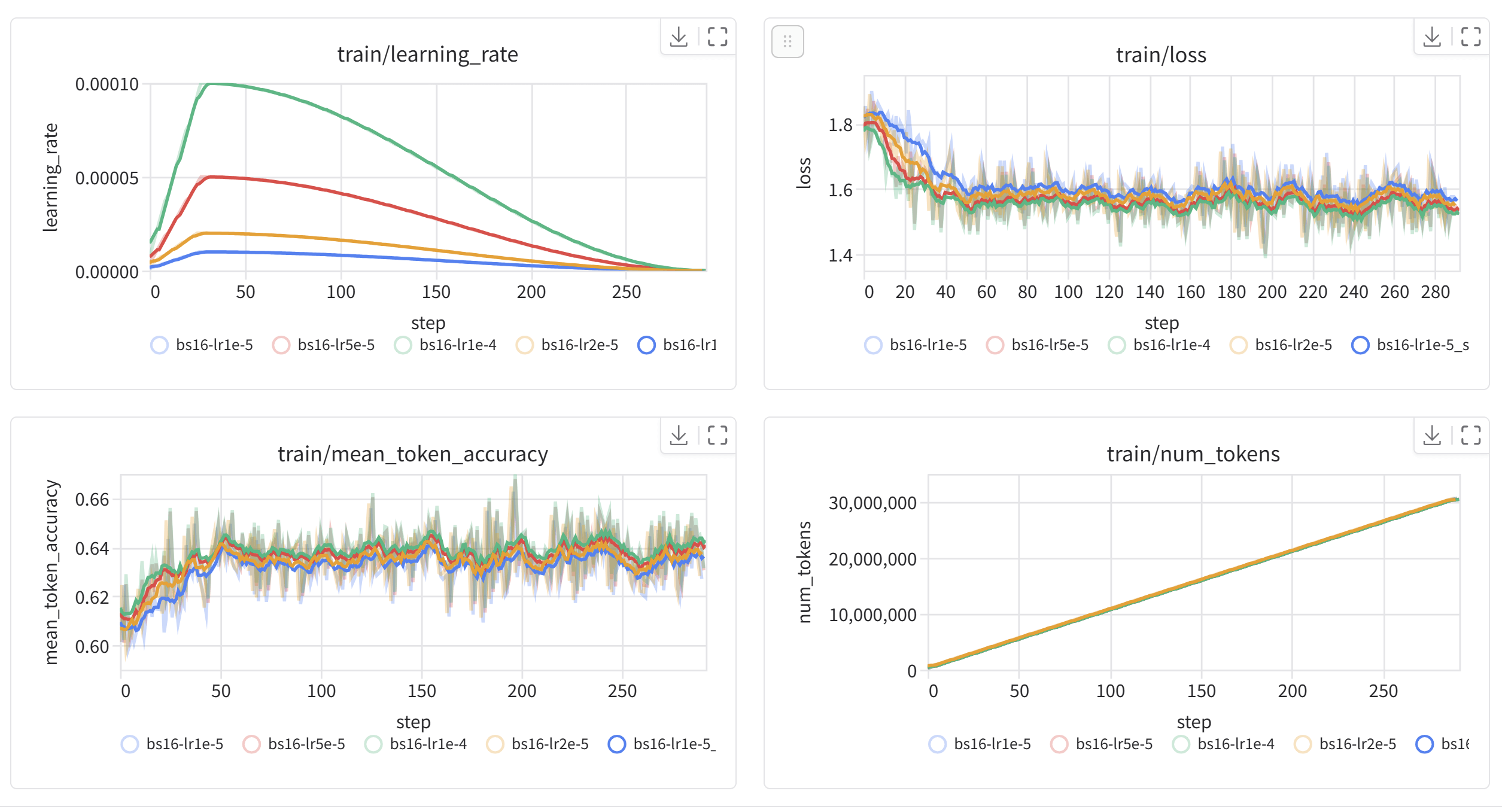
The skill includes Trackio integration, so you can watch training loss decrease in real-time. Jobs run asynchronously so you can close your terminal and come back later. When you want an update:
How's my training job doing?
Then the agent fetches the logs and summarizes progress.
Use Your Model
When training completes, your model is on the Hub:
from transformers import AutoModelForCausalLM, AutoTokenizer

model = AutoModelForCausalLM.from_pretrained("username/qwen-codeforces-cots-sft")
tokenizer = AutoTokenizer.from_pretrained("username/qwen-codeforces-cots-sft")
That's the full loop. You described what you wanted in plain English, and the agent handled GPU selection, script generation, job submission, authentication, and persistence. The whole thing cost about thirty cents.
Training Methods
The skill supports three training approaches. Understanding when to use each one helps you get better results.
Supervised Fine-Tuning (SFT)
SFT is where most projects start. You provide demonstration data—examples of inputs and desired outputs—and training adjusts the model to match those patterns.
Use SFT when you have high-quality examples of the behavior you want. Customer support conversations, code generation pairs, domain-specific Q&A—anything where you can show the model what good looks like.
Fine-tune Qwen3-0.6B on my-org/support-conversations for 3 epochs.
The agent validates the dataset, selects hardware (a10g-large with LoRA for a 7B model), and configures training with checkpoints and monitoring.
For models larger than 3B parameters, the agent automatically uses LoRA (Low-Rank Adaptation) to reduce memory requirements. This makes training 7B or 13B models feasible on single GPUs while preserving most of the quality of full fine-tuning.
Direct Preference Optimization (DPO)
DPO trains on preference pairs—responses where one is "chosen" and another is "rejected." This aligns model outputs with human preferences, typically after an initial SFT stage.
Use DPO when you have preference annotations from human labelers or automated comparisons. DPO optimizes directly for the preferred response without needing a separate reward model.
Run DPO on my-org/preference-data to align the SFT model I just trained.
The dataset has 'chosen' and 'rejected' columns.
DPO is sensitive to dataset format. It requires columns named exactly
chosenandrejected, or apromptcolumn with the input. The agent validates this first and shows you how to map columns if your dataset uses different names.
Group Relative Policy Optimization (GRPO)
GRPO is a reinforcement learning task that is proven to be effective on verifiable tasks like solving math problems, writing code, or any task with a programmatic success criterion.
Train a math reasoning model using GRPO on the openai/gsm8k dataset based on Qwen3-0.6B.
The model generates responses, receives rewards based on correctness, and learns from the outcomes. This is more complex than SFT or DPO, but the configuration is similar.
Hardware and Cost
The agent selects hardware based on your model size, but understanding the tradeoffs helps you make better decisions.
Model Size to GPU Mapping
For tiny models under 1B parameters, t4-small works well. These models train quickly—expect $1-2 for a full run. This is perfect for educational or experimental runs.
For small models (1-3B), step up to t4-medium or a10g-small. Training takes a few hours and costs $5-15.
For medium models (3-7B), you need a10g-large or a100-large with LoRA. Full fine-tuning doesn't fit, but LoRA makes these very trainable. Budget $15-40 for production.
For large models (7B+), this HF skills job is not suitable.
Demo vs Production
When testing a workflow, start small:
Do a quick test run to SFT Qwen-0.6B with 100 examples of my-org/support-conversations.
Th coding agent configures minimal training—enough to verify your pipeline works without real cost.
For production, be explicit:
SFT Qwen-0.6B for production on the full my-org/support-conversations.
Checkpoints every 500 steps, 3 epochs, cosine learning rate.
Always run a demo before committing to a multi-hour production job. A $0.50 demo that catches a format error saves a $30 failed run.
Dataset Validation
Dataset format is the most common source of training failures. The agent can validate datasets before you spend GPU time.
Check if my-org/conversation-data works for SFT training.
The agent runs a quick inspection on CPU (fractions of a penny) and reports:
Dataset validation for my-org/conversation-data:

SFT: ✓ READY
  Found 'messages' column with conversation format

DPO: ✗ INCOMPATIBLE
  Missing 'chosen' and 'rejected' columns
If your dataset needs transformation, the agent can show you how:
My DPO dataset uses 'good_response' and 'bad_response' instead
of 'chosen' and 'rejected'. How do I fix this?
The agent provides mapping code and can incorporate it directly into your training script.
Monitoring Training
Real-time monitoring helps you catch problems early. The skill configures Trackio by default—after submitting a job, you can watch metrics at:
https://huggingface.co/spaces/username/trackio
This shows training loss, learning rate, and validation metrics. A healthy run shows steadily decreasing loss.
Ask the agent about status anytime:
What's the status of my training job?
Job abc123xyz is running (45 minutes elapsed)

Current step: 850/1200
Training loss: 1.23 (↓ from 2.41 at start)
Learning rate: 1.2e-5

Estimated completion: ~20 minutes
If something goes wrong, the agent helps diagnose. Out of memory? the agent suggests reducing batch size or upgrading hardware. Dataset error? The agent identifies the mismatch. Timeout? The agent recommends longer duration or faster training settings.
Converting to GGUF
After training, you might want to run your model locally. The GGUF format works with llama.cpp and dependent tools like LM Studio, Ollama, etc.
Convert my fine-tuned model to GGUF with Q4_K_M quantization.
Push to username/my-model-gguf.
The agent submits a conversion job that merges LoRA adapters, converts to GGUF, applies quantization, and pushes to Hub.
Then use it locally:
llama-server -hf <username>/<model-name>:<quantization>

# For example, to run the Qwen3-1.7B-GGUF model on your local machine:
llama-server -hf unsloth/Qwen3-1.7B-GGUF:Q4_K_M
What's Next
We've shown that coding agents like Claude Code, Codex, or Gemini CLI can handle the full lifecycle of model fine-tuning: validating data, selecting hardware, generating scripts, submitting jobs, monitoring progress, and converting outputs. This turns what used to be a specialized skill into something you can do through conversation.
Some things to try:
- Fine-tune a model on your own dataset
- Build a preference-aligned model with SFT → DPO
- Train a reasoning model with GRPO on math or code
- Convert a model to GGUF and run it with Ollama
The skill is open source. You can extend it, customize it for your workflows, or use it as a starting point for other training scenarios.
Resources
- SKILL.md — Full skill documentation
- Training Methods — SFT, DPO, GRPO explained
- Hardware Guide — GPU selection and costs
- TRL Documentation — The underlying training library
- Hugging Face Jobs — Cloud training infrastructure
- Trackio — Real-time training monitoring