

Instructions to use agentscope-ai/QwenPaw-Flash-9B-Q8_0 with libraries, inference providers, notebooks, and local apps. Follow these links to get started.
- Libraries
- llama-cpp-python
How to use agentscope-ai/QwenPaw-Flash-9B-Q8_0 with llama-cpp-python:
# !pip install llama-cpp-python from llama_cpp import Llama llm = Llama.from_pretrained( repo_id="agentscope-ai/QwenPaw-Flash-9B-Q8_0", filename="QwenPaw-flash-9B-20260330-q8.gguf", )
llm.create_chat_completion( messages = "No input example has been defined for this model task." )
- Notebooks
- Google Colab
- Kaggle
- Local Apps
- llama.cpp
How to use agentscope-ai/QwenPaw-Flash-9B-Q8_0 with llama.cpp:
Install from brew
brew install llama.cpp # Start a local OpenAI-compatible server with a web UI: llama-server -hf agentscope-ai/QwenPaw-Flash-9B-Q8_0 # Run inference directly in the terminal: llama-cli -hf agentscope-ai/QwenPaw-Flash-9B-Q8_0
Install from WinGet (Windows)
winget install llama.cpp # Start a local OpenAI-compatible server with a web UI: llama-server -hf agentscope-ai/QwenPaw-Flash-9B-Q8_0 # Run inference directly in the terminal: llama-cli -hf agentscope-ai/QwenPaw-Flash-9B-Q8_0
Use pre-built binary
# Download pre-built binary from: # https://github.com/ggerganov/llama.cpp/releases # Start a local OpenAI-compatible server with a web UI: ./llama-server -hf agentscope-ai/QwenPaw-Flash-9B-Q8_0 # Run inference directly in the terminal: ./llama-cli -hf agentscope-ai/QwenPaw-Flash-9B-Q8_0
Build from source code
git clone https://github.com/ggerganov/llama.cpp.git cd llama.cpp cmake -B build cmake --build build -j --target llama-server llama-cli # Start a local OpenAI-compatible server with a web UI: ./build/bin/llama-server -hf agentscope-ai/QwenPaw-Flash-9B-Q8_0 # Run inference directly in the terminal: ./build/bin/llama-cli -hf agentscope-ai/QwenPaw-Flash-9B-Q8_0
Use Docker
docker model run hf.co/agentscope-ai/QwenPaw-Flash-9B-Q8_0
- LM Studio
- Jan
- Ollama
How to use agentscope-ai/QwenPaw-Flash-9B-Q8_0 with Ollama:
ollama run hf.co/agentscope-ai/QwenPaw-Flash-9B-Q8_0
- Unsloth Studio new
How to use agentscope-ai/QwenPaw-Flash-9B-Q8_0 with Unsloth Studio:
Install Unsloth Studio (macOS, Linux, WSL)
curl -fsSL https://unsloth.ai/install.sh | sh # Run unsloth studio unsloth studio -H 0.0.0.0 -p 8888 # Then open http://localhost:8888 in your browser # Search for agentscope-ai/QwenPaw-Flash-9B-Q8_0 to start chatting
Install Unsloth Studio (Windows)
irm https://unsloth.ai/install.ps1 | iex # Run unsloth studio unsloth studio -H 0.0.0.0 -p 8888 # Then open http://localhost:8888 in your browser # Search for agentscope-ai/QwenPaw-Flash-9B-Q8_0 to start chatting
Using HuggingFace Spaces for Unsloth
# No setup required # Open https://huggingface.co/spaces/unsloth/studio in your browser # Search for agentscope-ai/QwenPaw-Flash-9B-Q8_0 to start chatting
- Pi new
How to use agentscope-ai/QwenPaw-Flash-9B-Q8_0 with Pi:
Start the llama.cpp server
# Install llama.cpp: brew install llama.cpp # Start a local OpenAI-compatible server: llama-server -hf agentscope-ai/QwenPaw-Flash-9B-Q8_0
Configure the model in Pi
# Install Pi: npm install -g @mariozechner/pi-coding-agent # Add to ~/.pi/agent/models.json: { "providers": { "llama-cpp": { "baseUrl": "http://localhost:8080/v1", "api": "openai-completions", "apiKey": "none", "models": [ { "id": "agentscope-ai/QwenPaw-Flash-9B-Q8_0" } ] } } }Run Pi
# Start Pi in your project directory: pi
- Hermes Agent new
How to use agentscope-ai/QwenPaw-Flash-9B-Q8_0 with Hermes Agent:
Start the llama.cpp server
# Install llama.cpp: brew install llama.cpp # Start a local OpenAI-compatible server: llama-server -hf agentscope-ai/QwenPaw-Flash-9B-Q8_0
Configure Hermes
# Install Hermes: curl -fsSL https://hermes-agent.nousresearch.com/install.sh | bash hermes setup # Point Hermes at the local server: hermes config set model.provider custom hermes config set model.base_url http://127.0.0.1:8080/v1 hermes config set model.default agentscope-ai/QwenPaw-Flash-9B-Q8_0
Run Hermes
hermes
- Docker Model Runner
How to use agentscope-ai/QwenPaw-Flash-9B-Q8_0 with Docker Model Runner:
docker model run hf.co/agentscope-ai/QwenPaw-Flash-9B-Q8_0
- Lemonade
How to use agentscope-ai/QwenPaw-Flash-9B-Q8_0 with Lemonade:
Pull the model
# Download Lemonade from https://lemonade-server.ai/ lemonade pull agentscope-ai/QwenPaw-Flash-9B-Q8_0
Run and chat with the model
lemonade run user.QwenPaw-Flash-9B-Q8_0-{{QUANT_TAG}}List all available models
lemonade list
QwenPaw-Flash
QwenPaw-Flash is a lightweight model deeply optimized for the QwenPaw autonomous agent scenario. Since its training phase, the model has been specifically refined for QwenPaw tasks, delivering enhanced agentic performance in tool invocation, command execution, memory management, and multi-step planning.
Capability
The core strength of QwenPaw-Flash stems from its native integration with the QwenPaw ecosystem. We have constructed extensive, high-quality agent trajectory data sampled from real QwenPaw environments, systematically enhancing the model's proficiency in high-frequency daily scenarios. Key features include:
- Active Memory Management: Autonomously identifies, stores, and retrieves persistent user preferences and task states, ensuring high logical consistency across multi-turn interactions.
- Native File Parsing: Optimized for terminal operations and file system orchestration. Excels at generating precise CLI commands and executing complex, multi-step file I/O tasks.
- Efficient Information Search: Enhanced for web-search tool invocation. Features precise search intent recognition and multi-step web navigation to effectively identify and query online information.
- Intelligent Guidance: Built-in awareness of the QwenPaw feature map. Proactively suggests functional paths and troubleshooting based on real-time operational context.
Model Overview
QwenPaw-Flash-2B/4B/9B is fine-tuned from Qwen3.5-2B/4B/9B, sharing the same architectural parameters.
- Type: Causal Language Model with Vision Encoder
- Training Stage: Post-training
- Number of Parameters: 2B/4B/9B
- Hidden Dimension: 2048/2560/4096
- Token Embedding: 248320 (Padded)
- Number of Layers: 24/32/32
- Hidden Layout: 6/8/8 × (3 × (Gated DeltaNet → FFN) → 1 × (Gated Attention → FFN))
- Gated DeltaNet:
- Number of Linear Attention Heads: 16/32/32 for V and 16/16/16 for QK
- Head Dimension: 128
- Gated Attention:
- Number of Attention Heads: 8/16/16 for Q and 2/4/4 for KV
- Head Dimension: 256
- Rotary Position Embedding Dimension: 64
- Feed Forward Network: Intermediate Dimension: 6144/9216/12288
- LM Output: 248320 (Tied to token embedding)
- Context Length: 262,144 tokens natively
Benchmark Results
The complexity of QwenPaw's context engineering and tool usage poses heightened challenges for model evaluation. To address this, we have developed a dedicated benchmark tailored to the QwenPaw environment. This benchmark systematically evaluates model performance across five high-frequency usage scenarios, covering key operational dimensions.
Results indicate that QwenPaw-Flash delivers substantial improvements across multiple task categories, achieving performance comparable to leading flagship models—all while maintaining significantly lower resource requirements.
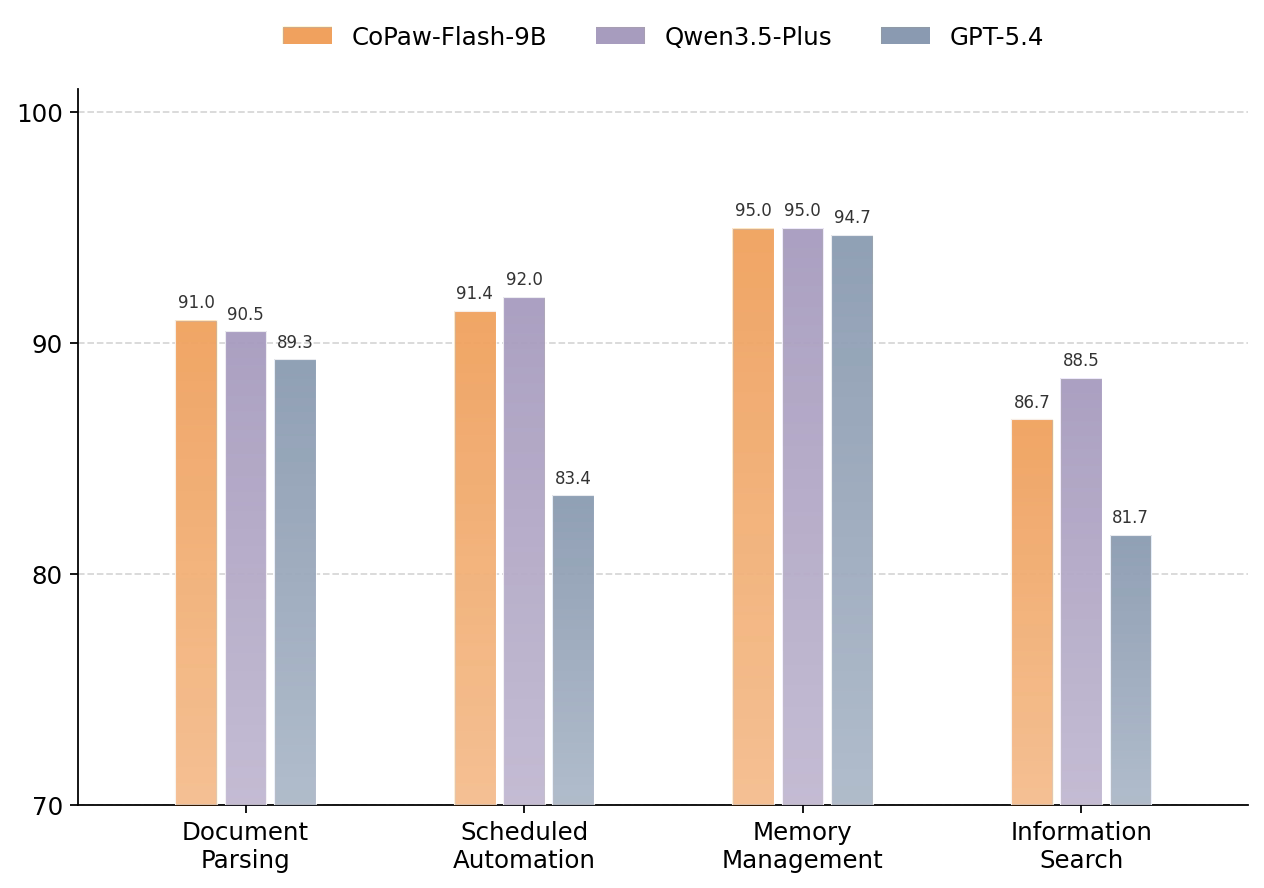
Figure 1: QwenPaw-Flash-9B compared with other models.
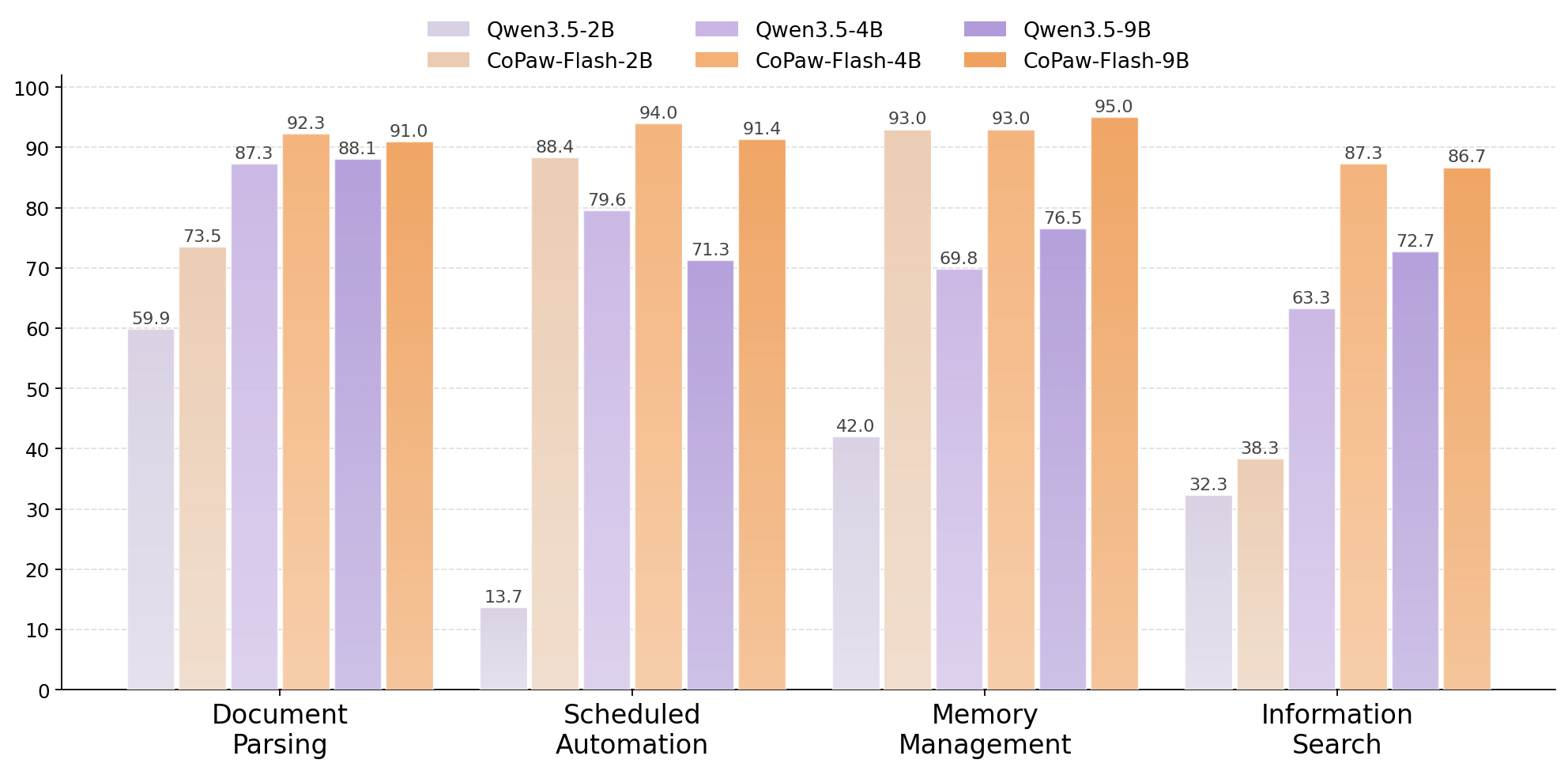
Figure 2: QwenPaw-Flash-2B/4B/9B compared with their respective baseline models.
Quickstart
Serving QwenPaw-Flash
QwenPaw-Flash can be served via APIs using popular inference frameworks. Below are example commands to launch OpenAI-compatible API servers for QwenPaw-Flash.
llama.cpp
Check out Qwen llama.cpp documentation for more usage guide.
We advise you to clone llama.cpp and install it following the official guide. We follow the latest version of llama.cpp.
llama-server -m /path/to/.gguf
Using QwenPaw-Flash via Chat Completions API
Once the server is running, you can access QwenPaw-Flash via standard HTTP requests or OpenAI-compatible SDKs.
Prerequisites
Ensure the OpenAI Python SDK is installed and your environment variables are configured:
pip install -U openai
# Set the following accordingly
export OPENAI_BASE_URL="http://localhost:8000/v1"
export OPENAI_API_KEY="EMPTY"
Text-Only Input Example
The following Python script demonstrates how to interact with the model using the OpenAI SDK:
from openai import OpenAI
# Configured by environment variables
client = OpenAI()
messages = [
{"role": "user", "content": "Hello, QwenPaw!"},
]
chat_response = client.chat.completions.create(
model=<your_model_path>,
messages=messages,
max_tokens=81920,
temperature=1.0,
top_p=0.95,
presence_penalty=1.5,
extra_body={
"top_k": 20,
},
)
print("Chat response:", chat_response)
Contact Us
QwenPaw-Flash is developed by the AgentScope Team. If you would like to leave us a message, feel free to get in touch through the channels below.
- Downloads last month
- 749
We're not able to determine the quantization variants.


